Product Notes & News

Martin Kay offers help and advice on audio, video & computer problems

I've been a regular contributor to user groups and technical forums for the last 20 years or so, and have written hundreds of posts on a whole range of computer, audio & video production topics. Trouble is, I never kept copies of any of them, which is why I've now created a web page for some of them.
Martin's latest post  -  3D Stereoscopic Video - a view from the sidelines

Let me start by saying that I've not exactly been "wowed" by the whole 3D bandwagon, but I am warming to it...  Read More


Avid Media Composer 6 - another milestone

Avid Media Composer 6 - the first 64-bit Avid
A few years ago Avid virtually halved the price of Media Composer, and in 2011 they've added another milestone with the release of Media Composer 6, the first native 64-bit version of their internationally acclaimed video editing software. Registered owners of Avid Xpress Pro or previous versions of Media Composer can upgrade from 350.00.  More Avid info & prices

Decklink Extreme HD - now supported in Avid

The  DeckLink HD Extreme adds HDMI capture and playback, plus new 3 Gb/s SDI support, and 3D lookup tables. Now you get all the power of film and high definition editing, at a standard definition price, and directly supported in Avid Media Composer 6 as well Final Cut Pro and Adobe Premiere Pro !
DeckLink HD Extreme connects to SDI, HDMI, component analogue, NTSC/PAL and S-Video equipment for capture and playback, while instantly switching between SD, HD and 2K resolutions. DeckLink HD Extreme includes 2 channels of AES/EBU digital audio I/O with a sample rate converter on the input, as well as 2 channel analogue audio I/O on XLRs.
More Decklink info & prices for other Blackmagic Design I/O cards

Live web streaming support services for small-scale events and webinars

Live web streaming and vision mixing from the desktopZEN Computer Services are launching a new back-end service to support live web streaming for smaller-scale events, product launches, training sessions, and suchlike. The service is aimed at video production companies and videographers with little or no prior experience of web streaming who have been asked to provide such a service as an add-on to existing video coverage.

At its simplest level, ZEN will provide the encoding equipment and operator, set up a web-page with customer-branded player and optional live chat window, and provide quality-control monitoring of the stream during transmission. Streaming costs can be calculated on a Pay-as-you-Go model based on the number of viewer-hours used, which is ideal for smaller audiences, as there is no minimum charge. The player can be password-protected to restrict the viewing numbers to an invited audience, further helping to keep costs under control.

The supporting services can be extended to include audio mixing and software vision mixing, allowing multiple cameras to be used, along with caption overlays and vision inserts from virtual VTRs. Whilst not intended as a replacement for a full OB, the system allows many of the same elements to be included in a live web broadcast, operated from a desktop PC, at a relatively modest cost.

Final details and rate card are still being worked on, but please phone or email if this is of interest


Panasonic AG-AF101 test shoot - interview footage

On 10th Dec '10, Martin was invited to an open day at Holdan, who are distributors for the AF101, the PAL-world version of the AF100. It afforded a chance to see this new camera and perform some hands-on tests.

Martin took the opportunity to shoot an interview with Richard Payne of Holdan talking about what Panasonic have given us with the AG-AF101, the new micro four-thirds video camera which records to AVCHD files from a single, large format sensor. The lens used was a Zeiss Distagon Compact Prime 35mm T2, with lighting from an LED panel for the key, plus tungsten fill, back and background lighting. Sound was from a 416 short gun mic on a stand, plugged directly into the camera.

    An interview shot with, and talking about, the new AG-AF101 camera


  Panasonic AG-AF101 test footage in HD, from Martin Kay on Vimeo

Encoded 1280x720, so best viewed Full Screen on the Vimeo site, in HD

also available on YouTube in 1920x1080 HD - Click Here  

Martin's comments:-
In use, the camera is not unlike Panasonic's other handi-cams (the 151 & 171) in many ways, but without the need to switch all the lens functions into manual mode, should that be the way you like to work. Since this was shot at an open day, in a relatively small space with other people present, there was not time for me to fully explore every feature and option that the camera has to offer, but I did want to take some footage away with me that was a little more meaningful than just pointing the camera at whatever was around me, lit only by the standard fluorescent house lighting. I hope this video gives some flavour as to the image quality of which this camera is capable when combined with quality lenses.

Part of the team at the IOV VideoSkills Roadshows

This year Martin has been one of the trainers at the IOV Videoskills Roadshows, aimed at helping videographers improve their basic skills. In the course of the day the topics covered include lighting, sound, camerawork and editing, with a two-handed interview as the sample subject matter. This is the resulting video from the Naas event.
Shot on a Canon XF305 and recorded in their 50MB/s 4:2:2 MPEG2  "BBC-approved" compression format. Edited in Premiere CS5. Lit with Kinoflo Diva 400 and Dedolights, and recorded on a 416 mic on a boom, connected directly to the XF305 camcorder.

    The last VideoSkills Roadshow was on 10th Nov in Naas, Ireland


  IOV Videoskills Roadshow - Naas in HD, from Martin Kay on Vimeo

Encoded 1280x720, so best viewed Full Screen on the Vimeo site, in HD

Matrox MXO2 for Mac


Matrox MXO family - The new range of MXO I/O boxes are designed to work with Final Cut on the Mac (both Macbooks and MacPro), Premiere CS4/5 on the PC, and in the case of the Mini will also soon support Avid Media Composer v5.

In all cases they serve as a portable breakout box with high quality analogue and digital video outputs. The MXO2 includes inputs as well as outputs and the range includes the following connection options:-

  • SD/HD-SDI with embedded audio (8ch)
  • HDMI with embedded audio (8ch)
  • YUV analogue component video
  • Y/C & Composite analogue video
  • Balanced audio (XLR)
  • Unbalanced audio (phono) for 5.1 surround monitoring
  • AES/EBU digital audio
  • SD/HD Genlock input

Matrox MAX - The MAX hardware is a faster-than-realtime H264 MPEG4 video encoder which is available as a PCI-Ex card (called CompressHD), or as a factory-fitted option to the MXO2 I/O boxes.  See Matrox page.


Blackmagic H264 USB Video Recorder

This handy little USB stick captures video direct to H.264 (MPEG4) video files for iPod, iPhone, Apple TV, YouTube and even full resolution video backups. Composite, Y/C or YUV video input (PAL/NTSC), analogue audio. For Mac only. Price 109.00  More from Blackmagic


Martin's mini-review of the Panasonic HMC 151 camera

-  recording in AVCHD format on SDHC cards


I had the chance of  trying out a Panasonic HMC 151 for a few days in February, and despite the cold weather shot about an hour's worth of assorted footage, both indoors and out, in a variety of lighting conditions. I've tried most (although not all) of its various features and options - certainly enough to form some opinions. See a sample clip on my dv2broadcast YouTube channel (click the HD button in the viewer for best results).

I liked:-
  • The pre-record buffer
  • The waveform monitor
  • The scene-file memories & selector knob
  • The switch layout, generally
  • The optical stabiliser - good when zoomed in handheld
  • The picture dynamic range handling
  • The focus assist histogram & switchable v/f peaking
  • Solid-state recording and picture review capabilities
  • The connectivity - CVS, YUV, HDMI & USB2
  • The low running costs from using SDHC cards
I was less impressed with:-
  • The auto-focus, which sometimes locked onto the background and ignored a centre-frame subject
  • Manual follow focus is still pretty difficult, despite the focus assist functions, which are best used before starting recording
  • The mic holder - a 416 wobbles about dreadfully
  • Lack of calibrations on the LCD audio level display
  • The lack of an interval record/timelapse function. I would have thought that this should be easy on a tapeless camera?
  • Poor software support for AVCHD files (eg Premiere CS4), but this is not Panasonic's fault!

I'm not a fan of compact cameras generally - I'd rather have something with a traditional manual lens on it - so I always miss having clearly marked focus and iris rings, but at least the HMC 151 has a "normal" zoom ring on which the servo can be disabled. What I couldn't fail to be impressed by was the overall picture quality when viewed as HD. I'd been monitoring the down-converted SD during much of my shooting, which looked OK but nothing special, so it was only when I finally viewed the AVCHD files via the Panasonic Viewer software that I saw the full amount of detail recorded. And it's this high picture quality, for the price, combined with the low running costs of SDHC cards, which make this camera appealing for a wide variety of applications.  Current price (as of Apr '09) is 3395.00 inc 2x16GB cards & reader.


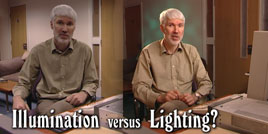
A short video about lighting in modern office buildings   

Lighting in modern office buildings

Inspired by the techniques shown at the IOV Videoskills Roadshows, in this short video Martin talks about, and demonstrates, the benefits of using lighting when filming in modern office buildings. With modern cameras able to get a well exposed picture in fairly low light, it's easy to forget what a difference lighting can make.

 Watch the video here


Premiere CS4.2 Notes - Matrox v4.2 drivers released Jan '10

Windows 7 is now with us, along with Premiere Pro CS4.2, and as usual this requires a new driver from Matrox to support their cards. The good news is that Matrox have now released new 4.2 drivers via their web site. These drivers are designed to work with Adobe's recently released 4.2 & 4.21 updates to Premiere Pro CS4, which you should not install until you can install the Matrox 4.2 drivers at the same time. This driver release also makes it possible to run the Matrox Compress HD hardware H264 accelerator alongside the RT.X2 in the same machine.

If you are running Adobe Premiere Pro CS4, you are probably already aware that Adobe's 4.1.0 update introduced major issues with Axio and RT.X2 systems unless you also upgraded the Matrox drivers to the matching 4.1 version, which you must download from Matrox. Because Adobe have an automatic updater to download and install their updates, there's a danger that you might update Premiere without realising the consequences, and subsequently think your system has developed a fault due to the driver mis-match.

If you have already installed the Adobe Premiere Pro CS4 4.1.0 update but not updated to Matrox's v4.1 drivers, you will loose transparency when using Matrox effects or videos containing alpha. You will also experience instabilities when using the Matrox chroma key and during rendering. Whilst we would recommend you install Matrox's v4.1 drivers, the other option is to revert back to Adobe Premiere Pro CS4 4.0.1. To do that, first uninstall Matrox Mx.tools or Axio.utils and Adobe Premiere Pro CS4 4.1.0. Once the Matrox and Adobe software has been removed, re-install Adobe Premiere Pro CS4 4.0 and then re-install the Adobe Premiere Pro CS4 4.0.1 update which is still available on the Adobe website. After the Adobe software is re-installed, re-install the original v4.0 Matrox Mx.tools or Axio.utils.


Click on image to enlarge

The changing face of Manchester

Those of you who have bought systems from us in the last few years may be familiar with our "Manchester Skyline" Windows wallpaper image (left) taken in January 2003 (from outside our old premises in Salford Quays). There has been a huge increase in residential building in the city since then, including the Beetham Tower, so we thought we'd offer an updated image from Summer 2006 (right).

Looking back at Caption Generation ...   
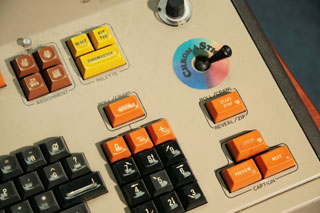
Aston keyboard detail Back in the days before microprocessors, Character Generators were members of the Graphics Department armed with sheets of Letraset and cardboard. The finished caption cards were then handed over to the stage crew who acted as "Caption Pullers". For a title caption sequence, cards were stacked in shooting order alternately into two separate piles (like A/B film rolls) and placed on blackboard-style easels somewhere in the studio. Two cameras (and cameramen) would be assigned to shooting the captions, with the Vision Mixer switching between them. As soon as the red light went out on the camera, the Caption Puller would pull the top caption off the pile and the cameraman would frame up on the one underneath.

The more complicated captions were made as a multi-layer cardboard sandwich, with holes in the front layer behind which cardboard tabs could be pulled out to reveal additional text or images beneath. Each one had to be individually made by hand and, with a few exceptions like the opening/closing station logo, could rarely be used again. (read more...)

The art of better sound - when to say "No"  (article on the support page)

For some people, their experience of recording sound starts with making wedding videos or recording other live events. As a sound recordist, you’re there to capture whatever is happening, as best you can. Getting better sound under those conditions usually involves better equipment, or making better use of what you’ve already got. But not all shoots are like that, and it’s easy to fall into the trap of thinking that’s the only way of working. What I’m saying is that whenever you can have any control over your environment, you should try to make use of it.

Directors and cameramen don’t make things easy. Sound is rarely seen as being as important as the pictures, and the soundman is well down the production hierarchy, so you have to learn to be assertive (but tactful). With few exceptions, no-one else on location actually listens to sound objectively. The human brain is remarkably good at rejecting unwanted noise when it suits us, and locations are usually chosen on the basis of how they look, not how they sound. Camera lenses offer 100% rejection of anything out of shot, but microphones don't, no matter how directional you think they are. So don’t just accept shooting in a noisy location without exploring the alternatives. Continued - read more...


Edit area at ZENBroadcast workflow on a DV budget

Once again we have been working on My North West for Granada TV, and the second series is now complete (weekly transmission started 7.30pm Thursday 23rd Aug 2007). This time there were 8 episodes, and we were involved with the location sound as well as online-editing/grading/dubbing. Unlike last year, the edit software this time was Avid Xpress Pro, and transfers to DigiBeta were via the SDI Mojo. All episodes passed Tech Review first time, except for one which was hit by the little-publicised Avid "green lines" codec bug in v5.2. So now we are better equipped than ever to offer our services and support to anyone undertaking independent production for broadcast. 

DV2Broadcast websiteThe previous year had the opportunity to test the Matrox RTX100 & Blackmagic Decklink cards in an "end to end" production process in which DVCam tapes for "My North West" were captured via an RTX100 and edited in 16:9 format using Premiere Pro v1.5 before being played out over SDI to DigiBeta via a Decklink card, again running with Premiere Pro. After the first five episodes had been transmitted in the Granada (North West) region, the viewing figures for Ep5 were 20% of the regional audience, against a national average of 15%.You can click here to see a 20 sec promo of Series 1. Please note, if you watched it with an eye for technical quality, that the best bits represent what the camera and edit system are capable of, and the worst bits represent the limitations of shooting on a DV format (eg with high contrast lighting conditions) or using less than optimum settings on the camera (which was an Ikegami HL-DV7). If you are in need of a broadcast mastering service, or just want to talk about our experience of using the equipment in this way, then give us a call and talk to Martin! (www.dv2broadcast.co.uk)

Video Forensics - Enhancement Software for Windows XP

is an affordable, easy-to-use video analysis system based on technology developed by experts at the US Institute for Forensic Imaging. Extend your capabilities, save time and get professional video enhancement at a reasonable cost by performing video image analysis with the easy-to-use CrimeVision software. Save raw and enhanced video clips and photos, and catalogue automatically by case number, location, date and other details. This is a stand-alone software package for the analysis of Video Surveillance material, and includes de-multiplexing capabilities. Running under Windows XP, it is designed to work with AVI video files, and is not tied to any particular video capture hardware or editing programme. We have a demo system operating at our Manchester base. Call for details, or read more here.


Exclusive Product

RTX video output adaptor
RTX-CVO

Lost or damaged the breakout cable for your RT.X10 or RT.X100? Or need something simpler to just get a video output for monitoring? The RTX-CVO plugs directly into any Matrox RTX card to give composite video out on a female BNC connector.

Price - 15.00

Systems we have been building...

(see more PC system specs here for video editing)

i7-980 system with GTX570 GPU...an i7-980 hex-core CPU on an Asus X58-chipset Sabertooth M/B filled with 24GB RAM, plus a 1.28GB GTX570 graphics card (which fills 3 backplane slots) and a 750W PSU. The whole unit is surprising compact (and quiet), in an Antec 300 case (as in the RTX2 system pic below) measuring 458 x 465 x 205 mm HxDxW. There's 7 usable disk bays, of which four are occupied, plus there's two eSATA ports & USB3 for external disk connections. O/S is Windows 7 Pro 64 bit. 

Matrox RT.X2 PC edting system from ZEN Computer Services
One of four i7 920 - RT.X2 LE editing systems supplied to Wyke 6th Form College, with dual 23" LCD PC & TV monitors

Lease plans and finance can be arranged for business users on all systems
Note - all prices quoted on this site are UK pounds - ex VAT

7-way DVD duplicator in new-style silver case12/16x Speed DVD +/-R Duplicators

We have 1>3 or 1>7 DVD Duplicator towers with 16x speed drives from NEC/Sony & Pioneer. The new controllers can copy from, or between, a DVD-ROM drive and a 120GB hard disk, on which can be stored a library of 25 DVD disk images. These can be easily duplicated without reference to the original DVD disk.

More info and prices including used DLT drives for DVD Mastering


Production Services from DV2Broadcast
Sound Recording, Lighting, Audio Dubbing
Picture Grading, Broadcast Mastering and more...

DV2Broadcast website

Here at ZEN we have successfully used AVG Anti Virus for many years on our PCs, and can definitely recommend it!

AVG Professional Single Edition

What we're about . . .      ZEN is not a traditional Audio-Visual dealer who started selling computers, nor is it a computer shop that also sells video editing systems. You won't get any salesmen giving you the "hard-sell" when you call, just straightforward advice and information - which for some callers is the knowledge that they don't need to buy whatever it is they thought they needed! Above all you'll be dealing with someone with a wide range of experience and knowledge of both PCs and video production. We're not the biggest, nor necessarily the cheapest, but we are one of the longest established computer/video specialists in the UK.

Company history . . .      ZEN was started in the 1980s by Martin Kay, then working for ITV at Granada's Manchester studios, who built his first 6502-based computer in 1979 from an Ohio Scientific kit, bought in the USA whilst working as a Sound Recordist on a film shoot for World In Action. With the advent of the Amiga, which could be gen-locked to a video source, Martin started writing a variety of video-related software. This included subtitling & tele-prompting, ident clocks, scoring software for sports & gameshows, and specialist software to mimic other computer displays for use in TV film dramas like Cracker, Prime Suspect and A Touch of Frost. Martin left Granada in 1993 to concentrate on his computer-video activities with ZEN, following a natural path into non-linear editing systems, now the main focus of the business, although he still maintains an active interest in video production.

ZEN - Home Page Phone 0161 736 5300 Copyright © 2011 Zen Computer Services.
All rights reserved. E&OE
Revised: 23 November, 2011